


 Reviewed By
On November 12, 2026, Google published a new help page explaining how site owners can identify Google Search traffic in their web analytics or server logs using the HTTP referrer header. The documentation may help when Search Console and analytics report different numbers for the same traffic.
What the Referer Header Shows
When a user clicks a result in Google Search, the browser or app includes an HTTP Referer request header showing where the request came from. Google Search uses the origin referrer policy, so the header contains only the scheme and host of the referring page with no URL path or query parameters.
This means the header can’t reveal what the user searched for. Google says site owners who want query data should continue to use the Performance report in Search Console. The values depend on where the user clicked.
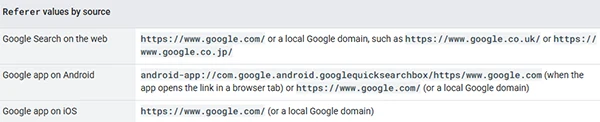
Google says Discover traffic uses the same values as the surface where the user viewed Discover, such as the Google app or Google Search on the web. Other Google services such as Google Images send the same values too, so their visits can appear alongside Search traffic when you match these referrer values.
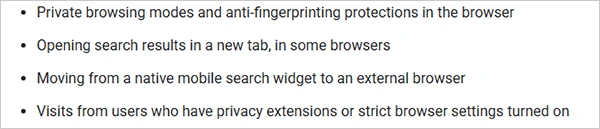
Referrer is sometimes blank because of private browsing modes, new tabs, mobile widgets, and privacy extensions.
How to Match The Google Search Referrer in Analytics
Google says most web analytics tools automatically recognise these values and classify the visits as organic search traffic from Google. If Google traffic is missing or appears as referral or direct traffic, site owners should check for custom channel rules, referral exclusions, or filters that may be reclassifying it. Those site owners who are using custom analytics or reading server logs directly should match the referrer field against the values listed above. Google also notes that browsers send a Referer header when fetching. But for those requests, the value is in the site owner’s page URL, so only the requests for the landing page itself should be counted.
Read More – Google Expands Ads in AI Mode to 10 More Countries
Why Referrer Numbers Won’t Match Search Console
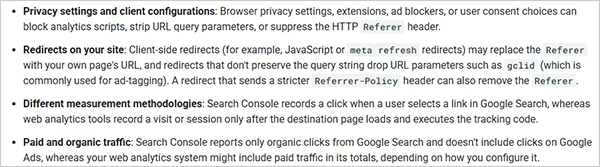
Google says referrer-based identification isn’t exact, and the figures often won’t match Search Console clicks 1:1. It lists four common causes:
- Privacy setting and client configurations
- Redirects on your site
- Different measurement methodologies
- Paid and organic traffic
Final Words
Checking the HTTP referrer header in server logs offers another way to confirm Google Search traffic in analytics and where it comes from Google Search. Google’s documentation gives teams a reference list to compare their own referrer rules against.


Leave a Comment
Your email address will not be published. Required fields are marked *