


 Reviewed By

You might be hearing about orphan pages for the first time. But they are very important for the health of your website and its SEO-related performance. If you only have one or two pages out of the site’s structure, you probably don’t need to worry about it. However, if there are scores of them piling up without your knowledge, that is a major concern!
In that case, it will not just create digital waste but also negatively impact your crawl budget. And there are other key considerations as well for you to reflect on. Thus, to learn more, refer to the following sections.
What are Orphan Pages?
An orphan page is a page on a website that has no internal links pointing to it from any other page on the same site. This can make it harder for search engines and users to find the page.
Thus, in a sense, orphan pages are pages that could have been indexed and attracted a lot of traffic by now if they had internal links. Some pages or articles don’t have internal links coming from other pages or already indexed resources on your website.
Consider a simple example to understand it better. Suppose your site only has 5 pages, namely A, B, C, D, and E. Now, B, C, D, and E are well-connected with each other through internal linking. But no page contains links directly connecting to page A. This makes this page outside the domain’s internally linked network. That is why we call A an orphan page.
Now, if search engines try to reach out to all the pages via interlinking, they will not find any path leading to page A. And that is where the power of internal linking comes in for better accessibility, crawlability, and indexing. And not to mention, a better interlinking strategy is also key to a better user experience.
Key insights: Page A in our example can still be accessed in other ways. For example, if the orphan page has an inbound link from another website. Or, a search engine can also find such a page through organic visibility when a user searches for a specific keyword and your orphan page shows up there as part of SERPs. These are major alternative discovery pathways.
Practical advice: Make periodic internal-linking assessment an integral part of your technical SEO checklist. That will make your audits more comprehensive and effective.
Common Characteristics of Orphan Pages
Let’s now consider the common characteristics of these pages after we have taken up what are orphan pages in the preceding heading. Here, we’ll cover zero internal links, live pages, and more.
1. Zero Internal Links
If you need to figure out whether a particular page is an orphan page or not, just look for this feature. Orphan pages don’t contain any internal links pointing to them from other pages on the same domain. That happens when you haven’t used a particular page while internal linking.
Even if the page has one link from a very old blog or any other source on your portal, that page isn’t an orphan anymore.
2. Live Page
The problem of being an orphan page arises when a live page has value to add, but it is unreachable. Users or search engines just cannot reach it because of zero pathways. There is no immediate way to navigate to and access its contents.
Key insight: That also means you cannot take advantage of your quality page. If it had been indexed by now, it would have significantly increased the authority of the website. That is because users would then use the page in multiple ways, making it popular.
3. Looking Normal (Most Challenging Case)
Some orphan pages are very difficult to find. Sometimes, a page might be indexed, but it is actually an isolated page that needs better interlinking. Other times, the tool that you use might not give you accurate results, and thus pages that are actually orphans are labelled otherwise. It can happen when Google Analytics (GA4) or even Google Search Console (GSC) ignores certain key factors, giving unreliable reports.
How to fix 👉: The best way to resolve this situation is to use more than one tool. Check your pages for sufficient internal linking on at least two different online platforms. It is best if you can afford to do that with paid tools. That way, you will get quality results, as sometimes free tools might not work properly!
Also Read: 30 Local Search Ranking Signals You Need to Know!
Common Reasons Why Orphan Pages Exist
Let’s now deal with common reasons why orphan pages exist in the first place. Sometimes, orphan pages are not a big deal. For example, it is a common practice to have them when you are dealing with specific campaigns and only targeting a select audience. But other times, such pages can also get created by mistake.
Major reasons for the existence of orphan pages are listed below.
- Poor housekeeping and technical debt
- Major trouble tracking
- Poor or incomplete (or partial) internal linking structure
- Content updates that remove links to a page without removing or redirecting the page itself
- Regular updates and site migrations, losing track of pages and where they are linked
- Keeping outdated campaign or landing pages after they are no longer needed, including past event pages, limited-time sales, and discontinued product pages, etc.
These are not all, but major causes of the existence of such abandoned and isolated pages on your site.
Reasons Why Orphan Pages are Bad for SEO
There is more than one reason why orphan pages are bad for your SEO. Such pages are missed opportunities. If they were indexed and ranked for target keywords, your site would have better traffic! Other reasons for that are provided below.
1. Difficulty in Indexing
No internal links pointing to a page from other pages on the same site means low page authority. Without internal links pointing to it, a page is harder for search engines to discover and may be indexed more slowly or not at all. Pages that are not indexed cannot rank in search results.
That is the first challenge a site owner faces with orphan pages.
2. Crawl Budget Exhaustion
Another reason why this category of pages is bad for your site is the limit of your crawl budget. This major concern particularly affects sites with scores of pages, where there are plenty of orphan pages. Thus, your crawl budget is already exhausted by the time the crawlers reach your quality pages.
This specific scenario might not apply to every site but is a major concern for platforms where content is published in great numbers. And your SEO performance gets hampered.
3. Low Performance
Internal and external links are major factors for a live page’s authority. Thus, in case we are dealing with an isolated page that cannot be easily navigated, indexing becomes very challenging. And even if such pages are indexed, they often perform badly due to low authority, quality, and relevance. That ultimately means little to no organic traffic!
Once you internally link this page from other well-performing existing pages, things will start to look up for the page too, and it will even perform well in search results.
4. Poor User Experience
Every page on the internet is meant to ensure a high user experience. The key is to ensure that the content is in accordance with the search intent. Searchers consider your content to be of high authority when they can easily find what they are looking for. But even if orphan pages have quality content, they are inaccessible.
Thus, whether your site has such pages or not literally makes no practical difference, as your target audience cannot take advantage of the useful information you have shared.
Understanding SEO better! If you want to satisfy search intent better, it is a must that you first understand the types of keywords in SEO in detail.
Also Read: 15 Important Local SEO Tools Every Business Should Use in 2027
How to Find Orphan Pages
It is very easy to find orphan pages with the help of Screaming Frog. You just need to consider the following steps carefully.
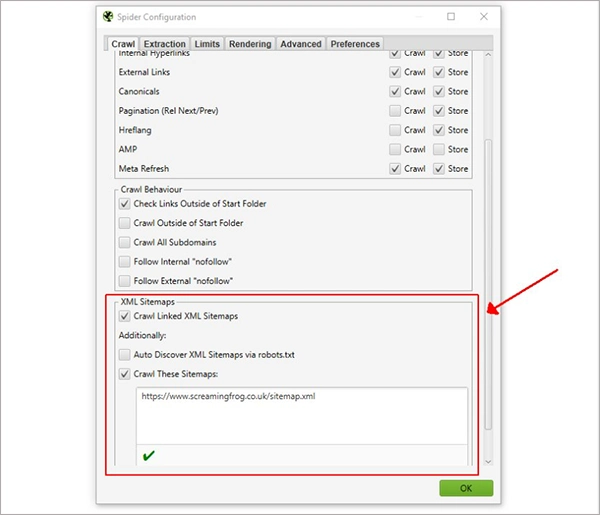
- Select ‘Crawl Linked XML Sitemaps’ under ‘Configuration > Spider > Crawl.’
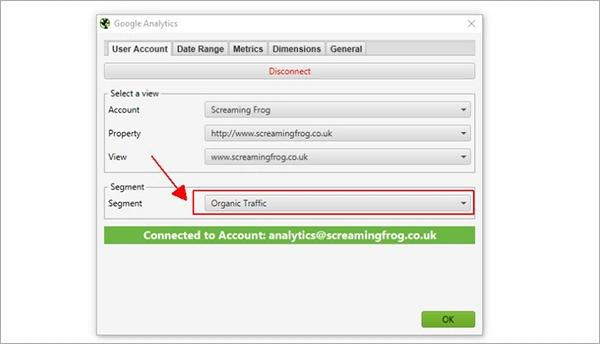
- Connect to Google Analytics under ‘Configuration > API Access.’ And choose ‘Organic Traffic’ in ‘Segment’ in case you want to find orphan pages from organic searches.
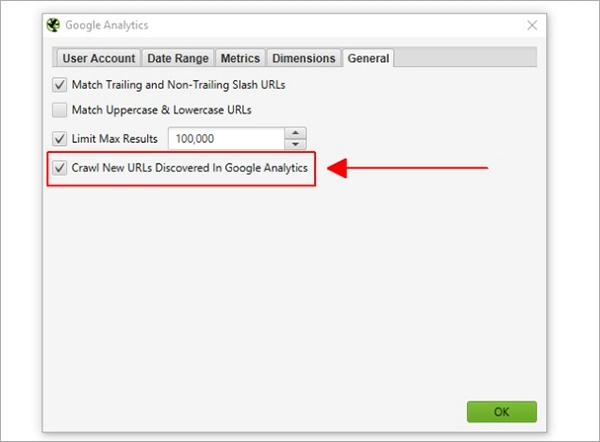
- Select ‘Crawl New URLs Discovered In Google Analytics.’
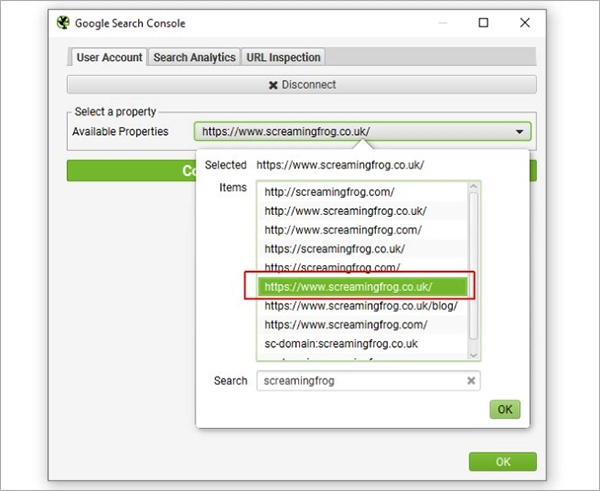
- Connect to Google Search Console under ‘Configuration > API Access.’ It will help you pull data such as CTR, clicks, impressions, and position metrics. Thus, you can know if orphan pages are also receiving any traffic for better analysis.
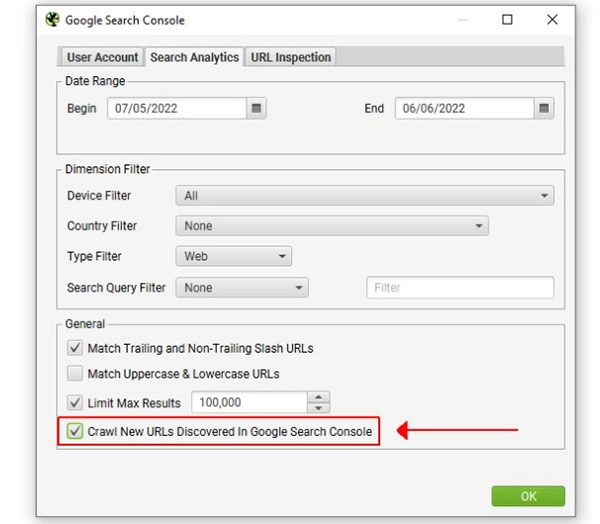
- Select ‘Crawl New URLs Discovered In Google Search Console.’ This option is available under ‘Search Analytics’, as provided in the screenshot below.
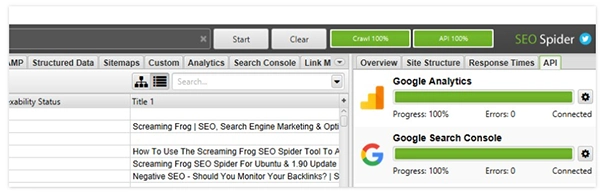
- Crawl The Website. And monitor its progress on the right. Refer to the screenshot below.
- Click ‘Crawl Analysis > Start’ To Populate Orphan URLs Filters.
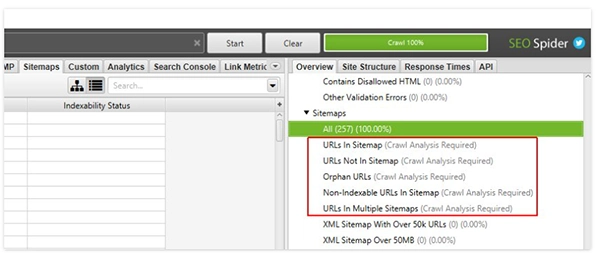
- Analyse ‘Orphan URLs’ Filters Under Sitemaps, Analytics & Search Console Tabs.
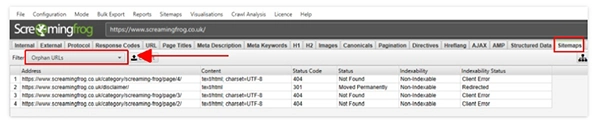
- Export Combined Orphan URLs via ‘Reports > Orphan Pages.’
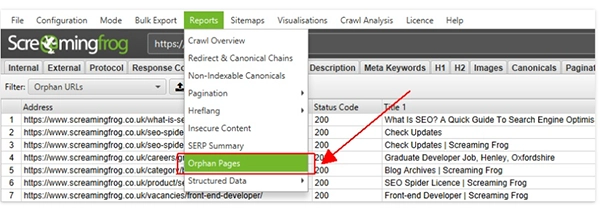
That way, you can find all of the orphan pages in one place for a highly convenient look. Besides, you can also use any other tool of your preference to find such pages outside your site’s internal linking infrastructure.
How to Fix Orphan Pages
To fix orphan pages, add internal links to existing pages that point to them. If they don’t have any value right now, eliminate them from your site’s structure altogether. Or, consider redirecting. Consider the steps provided below for more detail.
- The first step in fixing an orphan page is to decide whether it is currently useful or not.
- If it is useful, make sure there are sufficient internal links leading to the page from other authority pages and don’t forget to add it to the XML sitemap as well.
- In case the orphan page is not useful or relevant now, it is time to check its value. See how much organic traffic it is providing, the number of external links it has, and also the usefulness of its content.
- Suppose it has a decent amount of such value. That is when redirecting is the best choice. In that case, set a 301 redirect to the most relevant page.
- In case of no value, get rid of the page completely.
- And, don’t make a rush as you might end up deleting a quality orphan page if you have plenty to deal with in a little time.
Professionals’ Take on Orphan Pages
The expert opinions on orphan pages are also similar. These are discussed below in several points. Let’s also have a quick look at them.
- Loss of link equity: This page cannot take advantage of the authority passed from one page to another internally when belonging to the same website.
- Crawl budget waste: If Googlebot spends a lot of time processing many strewn orphan pages, it will have less capacity to focus on new content that is actually valuable and relevant as per the recent updates.
- Poor user experience: It is also part of professionals’ opinion that orphan pages lead to poor user experience. That is already covered in more detail above.
- Index bloat: Index bloat happens when a large number of low-value pages end up in a search engine’s index. If many of your orphan pages are low-value and still get indexed, it can become harder to keep track of the pages that actually matter.
Also Read: Google Search Console Adds New Multimodal Search Filter
Final Words
That is what orphan pages are and how you need to deal with them. These pages might have low-value content, and they might be having a bad impact on the overall performance of your site. But their existence is never the real problem. The real issue here is your failure to maintain a clean and high-value site. That happens when you don’t take continuous or periodic site monitoring seriously.



Leave a Comment
Your email address will not be published. Required fields are marked *