

SEO trends and requirements are evolving with the growing impact of LLMs on user search behaviors. Some recent developments, such as webMCP, have further elevated the standards to make the site compatible with search engines and AI agents alike.
However, someone starting a site in 2026 must consider adhering to some technical fundamentals before jumping to publishing content and making backlink.
Here is a crisp technical SEO checklist for 2026 that will help you understand some important fundamental requirements for a site.
Technical SEO Checklist 2026
SEO is an all-encompassing discipline, with technical SEO being one of its crucial branches. However, it matters more than others as it is more concerned with the site architecture and operational efficiencies.
If this goes wrong, all your efforts will go in vain, no matter how much informational content or valuable backlinks you have created.
Although this subniche is wide and deep, the technical SEO audit checklist for 2026 mentioned below with 11 essentials will help you make a good base for your site.
1. Check Loading Speed
The first step in this entire technical SEO checklist for 2026 is measuring the site loading speed.
For this, use Google’s PageSpeed Insight, enter your site, and see its performance insights.
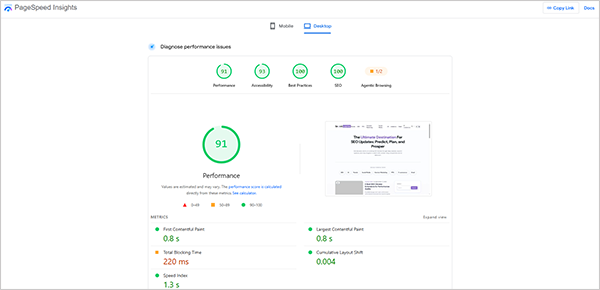
This will show you a report providing insight into how fast the site is loading.
Although there is no fixed threshold for the minimum time within which the site must load, Hostinger says:
“The industry benchmark for load time is 2 seconds, yet the average page load time is 2.5 seconds on desktop and a much slower 8.6 seconds on mobile devices.”
Here, the stats from Shopify are also worth mentioning.
“Every 100 milliseconds slower a store takes to load, conversion rates tend to be about 3.5% lower.”
Some simple ways to improve site loading speed are:
- Optimize Images: Use WebP format, compressed images, and keep their size below 100KB.
- Consider Best Hosting: The site loading speed is directly linked to hosting. Better hosting means faster speed and vice versa.
- Downsize or Eliminate Redirects: Redirects consume much time in jumping between pages to arrive at the target page. So, fewer redirects reduce the load time.
2. Crawling And Indexing Issues
An unindexed page is a liability, not an asset. It consumes space but doesn’t carry any worth.
For this, firstly check whether your page is indexed or not.
Just use the following syntax (without any spaces in between) and execute it in the Google search bar.
site:URL
If you find your page link, then it is indexed; if not, then the page hasn’t been crawled yet.
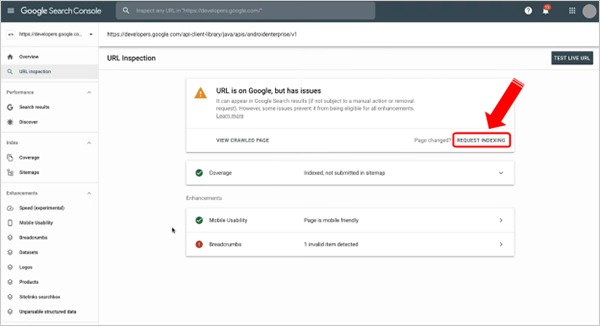
You can also request urgent page indexing by using the URL inspection tool in Google Search Console and clicking on “Request Indexing” on the result page.
Suggested Read: SEO 101: What Are The Fundamentals Of SEO?
3. Enhance Website Structure
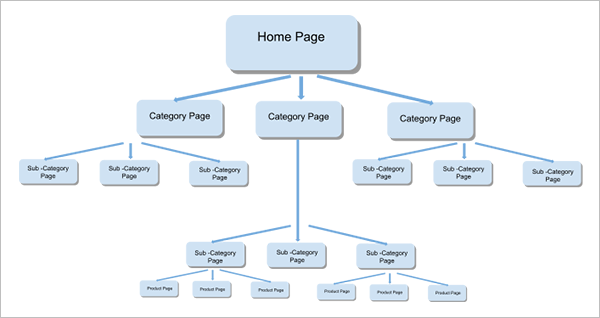
A site structure should be in the form of a hierarchy, i.e., a decent structure where the homepage will link to category pages, which further link to subcategory pages and then to the product pages. The site structure must look like a tree.
However, in large sites like ecommerce websites that have many product pages, the issue of faceted navigation might appear.
See our full guide to Faceted Navigation and Crawl Budget to understand the problem and learn more about it.
4. Utilise Interlinking and Breadcrumbs
Both interlinking and breadcrumbs are navigational features that help the crawler understand the page hierarchy and link one page with others on the site.
Interlinking the pages makes an intricate web where one page provides a way to others, allowing the user to explore more and spend more time on the site.
You can use the following suggestions for enhancing interlinking.
- Use at least 3-4 interlinks in 1000-word content.
- Add relevant anchor text for the interlinked page rather than just writing read more or click here.
- Try adding 1-2 page links in suggested reads or next reads.
Breadcrumbs are also a navigational element that links a product page with its sub-category and category pages. See the picture below.
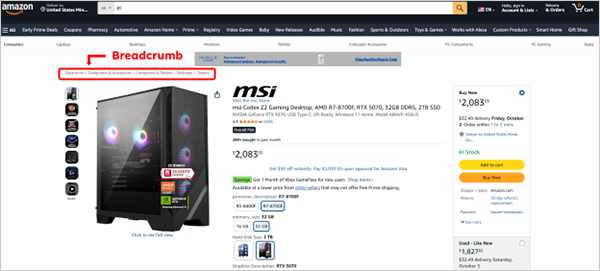
As part of the technical SEO audit checklist, try including them to allow crawlers to understand the site structure.
5. Use Schema Markups
Schema markups are the codes that help search engines and LLMs understand the page. They are generally written in 3 distinct formats, i.e., JSON-LD, Microdata, and RDFa.
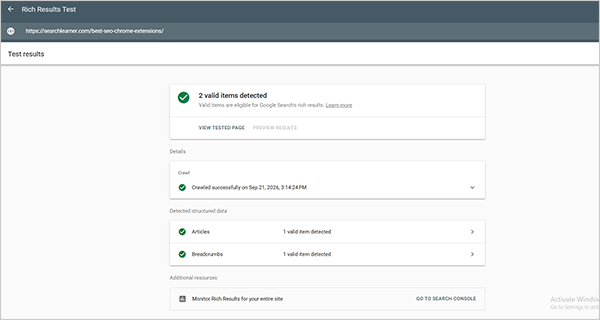
You can make schemas through a free schema generator tool and add them to your page. Once added, use Google’s Rich Results Test to see if it is correctly added or not.
6. Check Redirects
Redirects consume time and slow down the loading speed of the site. So addressing them demands utmost attention.
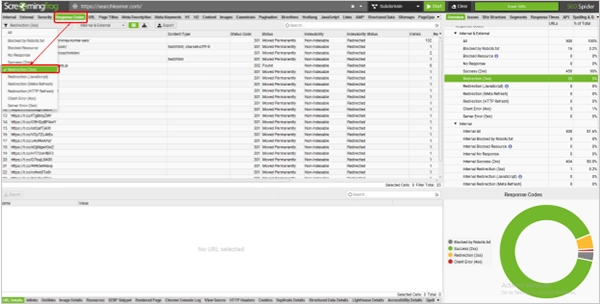
You can either check them through Google Search Console or through third-party applications such as Screaming Frog.
For Google Search Console, simply go to
GSC Dashboard → Indexing → Pages → Page with Redirect
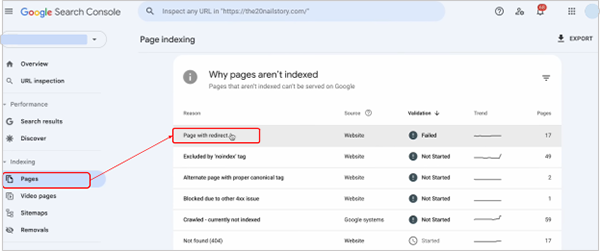
You can also download Screaming Frog and run a site analysis. Once the report is ready, go to:
Dashboard → Response code → Redirection (3xx)
7. Check URL Structure
Although the slug in the URL is generally considered part of On-page SEO, it also matters a lot for technical SEO too.
Here are some workable tips for it.
- Keep the length to 65± 5characters (not words).
- Don’t use unnecessary words like the, hence, etc. in the URL.
- Use a hyphen (-) instead of an underscore (_).
- Don’t change URLs too often. Do it only when direly required.
8. Consider HTTPS Secure Protocol
In 2024, Google published a blog announcing that “we’re starting to use HTTPS as a ranking signal”.
Google itself considers HTTPS a lightweight and more secure standard, and browsers these days have also started tagging non-HTTPS sites as insecure.
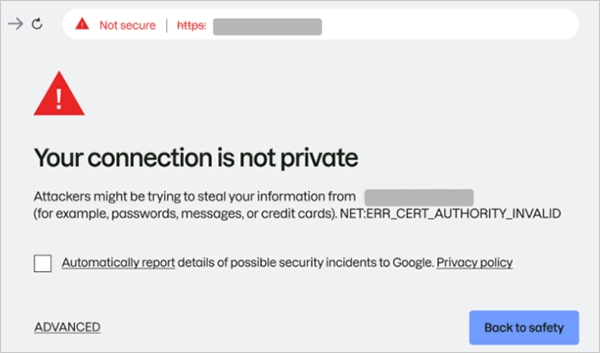
So make sure you get an SSL certificate, install it, and change your website links to https://.
9. Hreflang For Language
While targeting a multilingual audience, you need to use Hreflang to convey to search engines what language your content must appear in in a specific region.
For example, a website browsed in the US will appear in English, while the same website opened in France will show the content in French.
For this, you need to add some extra code to your XML sitemap.
Here is the code for French and Dutch languages.
<link rel=”alternate” hreflang=”x-default” href=”https://yourwebsite.com” />
<link rel=”alternate” hreflang=”fr-fr” href=”https://yourwebsite.com/de/” />
<link rel=”alternate” hreflang=”nl-nl” href=”https://yourwebsite.com/jp/” />
This has been clearly explained by Maile Ohye, former Developer Programs Tech Lead at Google, in a video embedded below.
You can also use AI bots like ChatGPT or Claude to generate syntax for required languages.
Note: Do it only when your site is targeting an international audience.
10. Address Broken Links
Broken links are simply URLs that don’t lead the user anywhere, i.e., the URL has no active page on it.
You can check for them using tools like Screaming Frog or Semrush, but Online Broken Link Checker can work well for this. Just run your test, see the report, and cross-check the broken links.
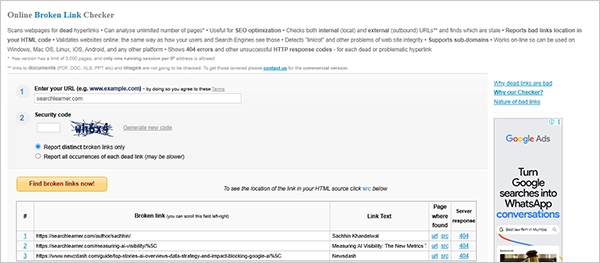
To sort them out, simply try the following remedies:
- Use a 301 redirect to send the search engines to a new URL.
- Update the URL for relevant substitute pages.
- Remove internal broken links by simply updating the content.
11. Duplicate Content
Posting duplicate content on a website reduces its efficiency and is considered a practice to refrain from in SEO.
It can be an issue with content on different pages of the same website or with pages on any other site.
Although you can track such pages through Semrush, Ahrefs, and Screaming Frog, using Google Search Console can be a good option.
Just go to:
| GSC Dashboard ↓ Indexing ↓ Pages ↓ Duplicate without user-selected canonical OR Duplicate, Google chose a different canonical than the user |
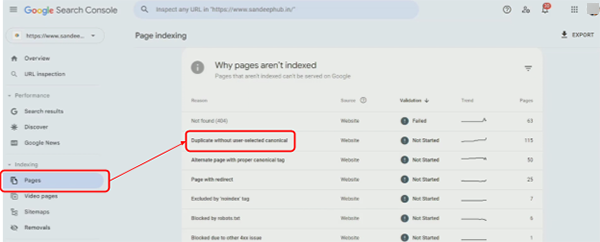
Here are some key solutions to this issue.
- Use a noindex tag on the syndicated page either manually or by using WordPress plugins such as Rank Math or Yoast SEO.
- Add canonical tags to convey the main URL.
- Apply a 301 redirect to renavigate the duplicate page to the original page.
- Update the content and make it unique, more productive, and valuable.
What are the Best Technical SEO Audit Tools?
Applying the above-mentioned technical SEO checklist for agencies might consume significant time. But using some SaaS tools will make the endeavor faster and more effective.
These tools are:
- Google Search Console: GSC is the most dependable tool for technical SEO. You can learn about the technicalities of the website through it, such as indexed pages, page redirects, URL inspections, submitting sitemaps, and checking Core Web Vitals.
- Google Analytics: GA is another magnificent tool to understand how the site is performing on desktop and smartphone, checking site structure, etc.
- Screaming Frog: Screaming Frog is one of the most used 3rd party tools that deeply inspects the website and provides a detailed report. It is more than just a site auditing tool, and its free version can scan 500 URLs. However, you need to subscribe to a plan to avail more services.
Aleyda Solis has also shared her views about Screaming Frog’s MCP and provided some of its benefits.
A new 🔥 release from @screamingfrog with v24.0, including their official MCP! This is one of those AI + SEO updates that I find genuinely useful, because it can help reduce a lot of the repetitive manual work involved in pulling, exporting, segmenting, and combining crawl data… pic.twitter.com/nBUefZcH14
— Aleyda Solis 🕊️ (@aleyda) May 19, 2026 - Chrome Extensions: Many of the best SEO Chrome extensions work well to analyse the pointers in the technical SEO audit checklist, which saves time and reduces effort by providing live on-tab reports.
Here is a full analysis of the 8 Best SEO Chrome Extensions for performance audits that you must have installed in Chrome.
- Semrush: Semrush is a popular SEO tool for on-page, off-page, technical, and keyword research. Its free services also provide limited insights into website performance, but it is highly advisable to use the paid version for a better experience.
- Ahrefs: Ahrefs has been a highly recommended technical SEO tool for its deep website analysis, issue categorisation, and suggested fixes.
Brodie Clark also mentioned it as one of the best technical SEO tools in his X post.
Sum Up
This technical SEO checklist 2026 has all that you need to consider and ensure to enhance a website’s performance. These are the essentials not just for performing better on Google but also on LLMs. Jake Ward has also affirmed that the scope of SEO has expanded beyond Google, and AI agents need to be targeted equally and in parallel.
Leave a Comment
Your email address will not be published. Required fields are marked *