

A published page won’t rank until it meets some desired standards that search engines and LLMs demand. Here, website performance audits come into play.
Although there are many SaaS tools available for it, such as Semrush and Ahrefs, and downloadable applications such as Screaming Frog, a few SEO Chrome extensions can bring vital performance metrics and insights right beside your web page.
Out of the countless such tools, the 8 best SEO Chrome extensions can simplify your workflow by conducting live performance audits.
8 Best Free SEO Chrome Extensions for Performance Audits
Chrome’s extension window shelf is flooded with countless SEO tools. But a few work reliably for performance audits. The rest are either not necessary or have duplicate functions.
Here are 8 Chrome extensions for performance audits, perfect for SEO 101 and seasoned digital marketers alike.
1. Website Page Counter
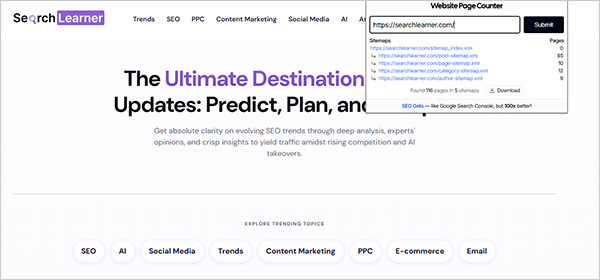
Website Page Counter quickly counts the total pages on a site by crawling the sitemap, and the report can be downloaded easily in a few clicks. The most potent use of this extension is for e-commerce sites to compare the pages and listed products on their site, i.e., for competitor research and finding gaps.
This will also help in checking faceted navigation issues and enhancing website performance.
2. SEO Glance
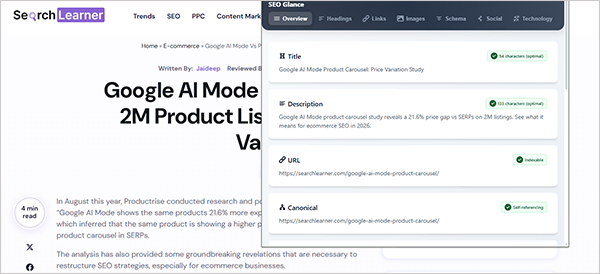
SEO Glance is one of the all-encompassing tools that performs a deep technical audit of the concerned page. It provides an in-depth inspection of the headings, links, images, schema, social media, and technical analysis, which makes it great for SEO experts, especially those handling e-commerce sites.
3. Headings Map
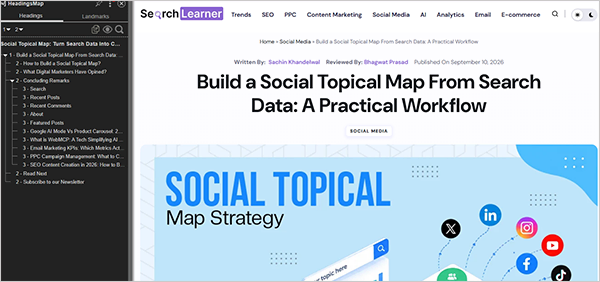
Heading Map is the next free SEO Chrome extension for performance audits that shows the entire blueprint of the headings, sections, and landmarks on the respective webpage. The extension shows all headings from H1 to H6 and is essential for analysing the published page and checking for formatting errors to ensure proper On-page SEO.
4. SEO Quake By Semrush
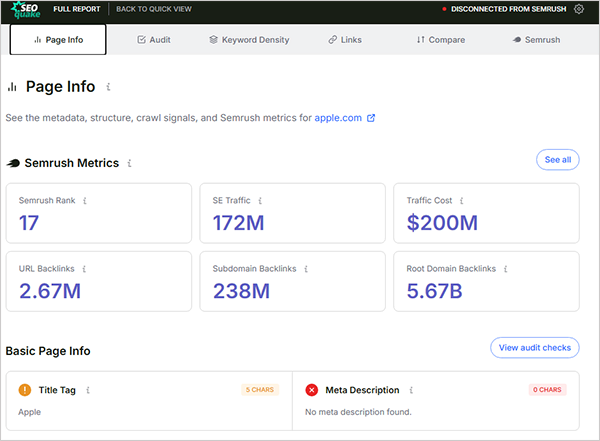
SEO Quake by Semrush is a multifunctional on-page SEO tracking tool that simultaneously checks technical issues, keyword density, and analyses internal and external links. No login required; no sign-ups necessary. Just install and use.
For every website you open, an SEO bar will be shown at the top with the necessary information. Just click on any of the provided metrics or icons and see the entire page report in a new window.
Suggested Read: How AI Agents for SEO Can Turn Data Into Action
5. Meta SEO Inspector
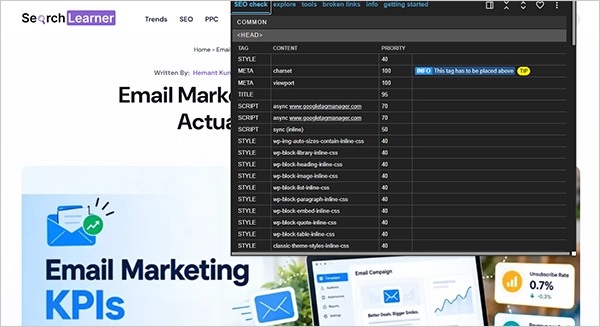
Meta SEO Inspector is one of the best SEO Chrome extensions to check the metadata, page structure, site files, links, social media graph, and Twitter tags. Some of its new features include a broken link checker, one-click data extraction, and suggesting suitable SEO fixes.
6. Speed Vitals
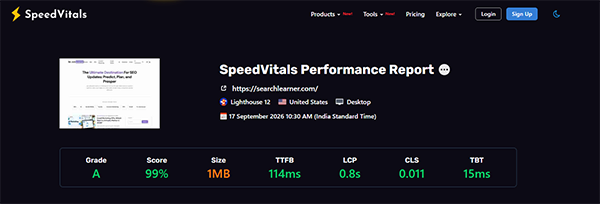
Speed Vitals is another technical SEO Chrome extension that performs TTFB and Web Vitals tests on multiple devices and locations. Besides, it also includes code coverage, a layout shift visualizer, field data, and a waterfall chart.
Just install it, browse your target site, open SpeedVitals in the extension bar, and run a test. That’s it.
7. SimilarWeb
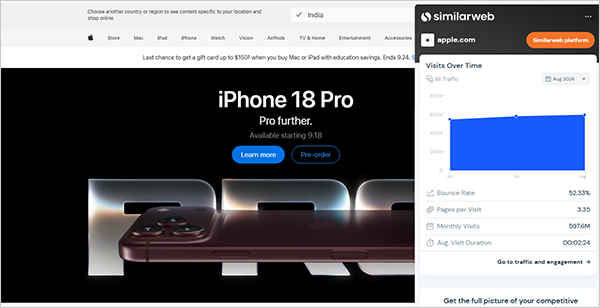
Similarweb is a popular SEO tool, and its extension works live on Chrome, providing key insights about the website. This single extension provides traffic, bounce rate, pages per visit, keywords on which the pages are ranking, and AI traffic distribution.
Its Top Prompt Section and the Geography and Traffic Source are highly relevant for optimising the SEO strategy.
8. Plerdy UX & Usability Testing
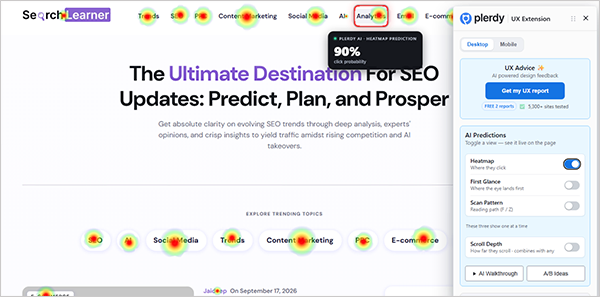
Plerdy UX & Usability Testing is a powerful SEO Chrome extension that identifies visual focal points and click hotspots on a webpage. Its Heatmap, First Glance, Scan Pattern, and Scroll Depth features predict user engagement with the page components and options. This can be a valuable tool to learn what to focus on and what to keep as a secondary option.
What SEO Experts Have Suggested?
Josh Crouch has provided his Chrome extension list for SEO audits, relevant for Local SEO operations. Some of these work best in the paid versions, like Ahrefs, while others will work great in free versions.
Peter Rota has also shared a list of such SEO Chrome extensions with definite functions rather than all-encompassing options.
Matt Diggity has also provided a list of must-have SEO extensions in his YouTube video.
From this video, you can consider SEO Minions from that list for better technical audits. The Detailed SEO extension suggested by Matt works the same as the SEO glance mentioned above.
Final Words
These 8 best SEO Chrome extensions for performance audits will help you learn the technicalities of the website or a particular page without juggling between the tools. However, they will only show you the core issues; you yourself have to fix them.
Also, install the extensions that are relevant to your niche. For example, a website page counter is beneficial for ecommerce sites but does not have much scope for small websites.
So choose wisely.
Also Read: How Long Does SEO Take in 2026? Factors Affecting Results
Leave a Comment
Your email address will not be published. Required fields are marked *