


 Reviewed By
- What Does “Crawled Currently Not Indexed” Mean in Google Search Console?
-
How to Fix Crawled Not Indexed: Common Issues & Fixes
- 1. Thin or Low-Value Content
- 2. Duplicate or Near-Duplicate Pages
- 3. Low Overall Site Quality
- 4. Orphan Pages
- 5. Incorrect Canonical Tags
- 6. Too Many Pages Made at Scale
- 7. Search Intent Mismatch
- 8. Page Not Rendering Properly
- 9. Non-Page URLs (RSS, Images)
- 10. Report Lag
- 11. Google Prefers Other Pages of Your Site
- 12. Same Page Served on Every URL
- 13. Crawl Budget Waste
- Conclusion
Do you suddenly see the “Crawled currently not indexed” message on your pages? If yes, don’t worry. If it can be fixed, you will learn about it in this guide below. Otherwise, you don’t need to worry about it. Most of the time, this status is shown for URLs that are not even meant to appear on SERPs. Thus, there is nothing that you need to do to fix the message here.
Learn more about its true implications, potential causes, and fixes from the following read. Let’s start with the definition first.
What Does “Crawled Currently Not Indexed” Mean in Google Search Console?
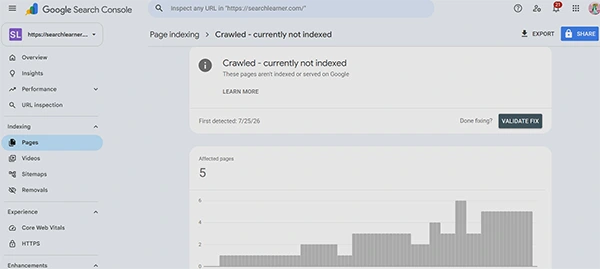
The crawled currently not indexed status meaning is pretty simple. Google has crawled your published content, but deliberately chooses not to index it. The implication of this status is that your page or blog, or any other type of content, will not show up on Google’s SERPs in response to any of the users’ relevant queries.
Sometimes, it is nothing, and you just don’t need to be very serious about it. It will resolve in a simple, single step. However, other times, it requires your attention for a complete resolution. For more, go through the following sections.
Also Read: 15 Important Local SEO Tools Every Business Should Use in 2027
How to Fix Crawled Not Indexed: Common Issues & Fixes
Consider the following reasons why you get the crawled currently not indexed problem on your published content. In other words, these are the reasons why Google crawled but didn’t index your pages!
However, not every time should this message be cause for worry! Sometimes, you just don’t need to do anything at all, because it will resolve on its own.
Note that delays in indexing due to the long-standing issues in Search Console are resolved now if you haven’t gone through the Google page indexing report update already.
Yet, let’s start our checklist with key fixes that might resolve this tag faster!
1. Thin or Low-Value Content
Sometimes, the content you upload isn’t up to the mark. Its quality isn’t what a search engine is looking for. Google goes through such a page and evaluates that its content doesn’t have anything unique to add or is of poor quality compared to the information already indexed from other sites.
👉 Fix: Try to share unique and original information in your content. Make sure you satisfy the search intent of the primary keyword exhaustively, without leaving anything out. Also, if two of your published blogs or articles belong to the same parent topic, merge them together into one stronger and more comprehensive piece of content. That ensures a better user experience.
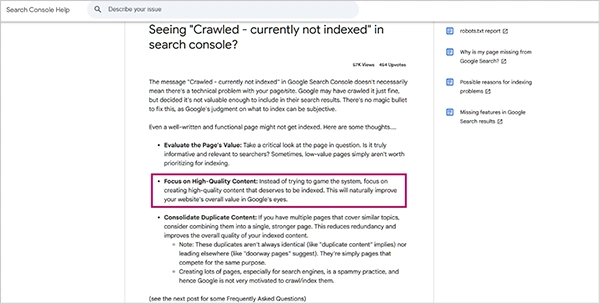
The importance of quality content is immense if you don’t want this “crawled but not indexed” label to attach to your published URLs. Barry Hunter, in his original post on Seeing “Crawled – currently not indexed” in Search Console?, also explains the same relationship!
2. Duplicate or Near-Duplicate Pages
The next point to consider on how to fix crawled – currently not indexed is related to the presence of duplicate or near-duplicate content. If you have written two blogs on the same topic, Google isn’t going to index both. That will lead to a well-known condition of keyword cannibalization. This situation often leads to frequent ranking fluctuations, and no page gets ultimate authority.
👉 Fix: The simple solution here is to merge the pages into one piece of content. Or, you can also resolve this issue by adding a canonical tag to the preferred version. But if you have time and resources, make sure you just merge everything into one page for better page authority and online visibility.
3. Low Overall Site Quality
Google also doesn’t want to index pages on a site if all of its published content is of very low quality. Many weak pages across a particular website create a low-quality signal that Google can never miss due to the growing demand for high user experience.
👉 Fix: If you really want to index faster here, pay attention to improving your content. Make sure that you remove all of your low-quality pages. Only focus on what will be helpful for your audience and remove the rest right away.
4. Orphan Pages
Orphan pages also attract the crawled currently not indexed tag. That is because when there are no internal links pointing to a particular page, Google gets no signal that it matters at all. And the result is non-indexing.
👉 Fix: The only fix to this aspect is that you always add internal links from all the relevant and related pages on your domain. While you plan the draft of new content, figure out all the internal link opportunities from the existing published pages, blogs, articles, etc. That way, you can ensure no content is left out and made an orphan.
5. Incorrect Canonical Tags
If you have used a canonical tag incorrectly, that would also create the problem of crawled not indexed. Some major issues related to the incorrect use of canonical tags are listed below.
- Pointing to a different URL
- Chains and loops
- Canonicalizing to broken, blocked, or noindexed pages
- Dynamic or template mishaps
For example, the first mistake is that the tag is pointing to a different URL. When made, it leads to the page telling Google that another URL is the main version. And thus, this one will get completely skipped in the process.
👉 Fix: Make sure your canonical tags are correct. You can also check the Google-selected canonical in URL inspection. For the chains and loops problem, make sure that your tag only points to a single piece of content. Thus, this way, find what the exact problem is related to the use of the canonical tag and then resolve it.
Note: That is where a technical SEO checklist will come in most handy.
6. Too Many Pages Made at Scale
If you are new to SEO and thus just create low-quality pages for your brand new website at scale with AI, you are most likely to soon get this status. Such pages often don’t add any value to the user experience. For the same reason, Google doesn’t want to index them. Skipping them to value other high-standard content thus becomes the only solution at the disposal of a search engine.
👉 Fix: IMR is the best solution here. Improve, merge, or remove. Improve the quality of the content. There are many factors that you have to consider for that. One of them—the most crucial factor—is to focus on the search intent of the keyword while you write the content. That will boost the quality of your short- and long-form publications considerably. Furthermore, Don’t forget to keep only those pages on your site that truly matter.
7. Search Intent Mismatch
When your pages or blogs don’t help Google produce relevant results as per the intent of the search terms or keywords, you should expect crawled currently not indexed. Your content must be well-aligned with the searches people are making. Google in this situation just prefers those publications that satisfy the intent of the user most.
👉 Fix: See what a searcher truly wants from typing a particular keyword into a search engine. That is key to getting most traffic online. In anticipation of the desired information, people just want to click on the URL and read the content all the way through. Thus, try to make your content completely relevant to the intentions behind primary keywords or searches.
8. Page Not Rendering Properly
Sometimes, Googlebot can easily fetch the page, but it becomes difficult for it to access its core parts. Well, that usually happens when essential page elements fail to load during JavaScript processing. Because of that, what Google sees is just a broken DOM, which is short for Document Object Model. Thus, there is no reason to index such a useless page or piece of content.
👉 Fix: So, if you ask how to fix crawled – currently not indexed, that is simple. First, diagnose properly. Use the URL inspection tool in Google Search Console for that purpose. Look for robots.txt files, if any. Switch to server-side rendering (SSR) or even hybrid rendering. As a bonus tip, improve your page load speed, as it also optimizes script execution and reduces heavy client-side rendering problems.
9. Non-Page URLs (RSS, Images)
Non-page URLs, such as those belonging to RSS, images, etc., also show this status. That is because these URLs are files and not pages. And for the same reason, Google just crawls them without indexing.
👉 Fix: Most beginners just don’t know about this condition. And the minute they see this message on their URLs, they start worrying about it. Look carefully. These could be non-page URLs. If yes, you don’t need to do anything about it.
10. Report Lag
That is also key when considering fixes to the crawled currently not indexed status. The report takes time to get fully updated. Hence, you see “not indexed” even though the page may have already been indexed.
👉 Fix: Check the URL in URL inspection. See if the URL is on Google. If it is, you don’t need to do anything at all. Just wait until the same changes also start appearing in the reports.
11. Google Prefers Other Pages of Your Site
Sometimes, Google prefers to index other pages of your site. That happens when other pages are better qualified than the affected piece of content. You might be facing this issue, most probably, due to keyword cannibalization. If not, make sure you haven’t used the canonical tags improperly.
👉 Fix: Check if any of the already discussed issues are the culprit here. And if you find the quality of the content to be low, see if there is any mismatch between what you have provided and what the search intent demands. Additionally, remove or merge pages where most of the published materials just deal with the same matter or primary keywords. If it is a sub-topic, you can think of merging it with the content addressing parent keywords or topics.
12. Same Page Served on Every URL
Sometimes, the same page is served on every URL. It is a technical issue. Google, when crawling such pages, thinks that they all contain the same content. That is why all pages are considered or treated as one. As a result, you see the crawled not indexed status.
👉 Fix: To resolve this issue, you are going to need a developer. They will either fix the server or routing. So, each of the not indexed URLs will show its own unique content. After fixing the issue, updates will take time to show in your reports.
13. Crawl Budget Waste
If you don’t take your crawl budget seriously, you might have to face this problem. That is because Google will run out of the allocated budget by the time it reaches the important pages. Thus, key pages or articles get the least attention.
👉 Fix: Make sure that all your low-value URLs are blocked or removed. Only keep the most important pages that are key to your business operations and the target audience. That way, your crawling won’t be wasted on pages that don’t matter at all.
Also Read: Google Search Console Adds New Multimodal Search Filter
Conclusion
These are the 13 major issues that can cause the crawled currently not indexed status to show for your published URLs. Fixes are also provided alongside so that you can resolve prevailing problems instantly. However, if you find that you cannot resolve the issue all by yourself, make sure that you talk to an SEO. Or, to be more precise, connect with an expert who has in-depth knowledge of technical SEO.
Sometimes, this message just doesn’t require any action on your part, and thus doing something might only make the situation worse.



Leave a Comment
Your email address will not be published. Required fields are marked *