


Poor image quality won’t stop products from showing in Google Search or Google Ads. Google has revised the statement in its Merchant Center help document that products with low-image-quality issues are now shown in ads and free listings but receive a warning if the image is smaller than 500×500, and for AI-generated images, it is required to add a label.
Warning on Low Image Quality
Product visibility is important to increase user engagement and clicks, which can be achieved with high-resolution, detailed product images that provide a better user experience.

Google announced that advertisers will receive a warning when an image is smaller than 500*500 pixels, no matter if it’s larger than the minimum requirements.
AI Label Should be Shown to Customers
Google also asks that a label be shown on product images that are created or edited using AI. If you haven’t labeled directly in your Ad creative, then you can use the AI label setting in your ads editor.
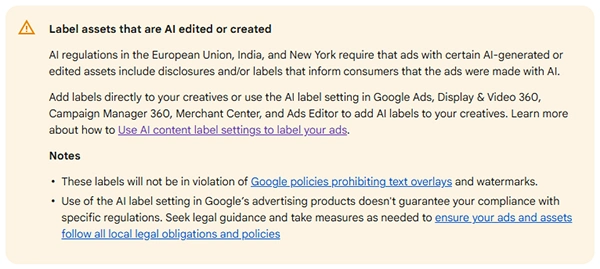
Adding any text such as a CTA, pricing, or any kind of watermark on Ad creatives violates the policies as it is. But these AI labels from settings are not going to violate the promotional policy. But adding the AI label is not a guarantee that you are following all policies for AI-generated products; so be sure that your creative is following every Google Ads policy.
What is Changed in Current Version
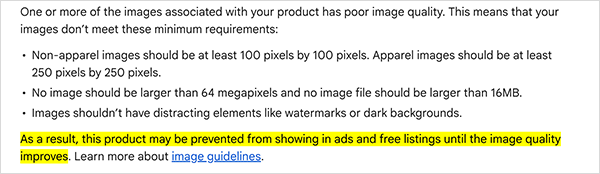
From 4 September 2025, in an archived Merchant Center help document, Google said low-quality or blurred images will stop showing in ads and free listings until they are improved.
But,
On the current help page, Google announced that pixelated, blurry, or low-resolution product images will continue to show in free listings and ads.

There are new AI-supported features added in Merchant Center
Image Quality Matters
Yes, Google says in its Merchant Center help document that it will show ads if images are poor quality, but after an ad observation and studying ad performance, it is always seen that product image quality is a big factor for better engagement and clicks. Google enforced that image quality should be 500*500 after 31 January 2027 and recommends at least 1500*1500 for best performance.
How to Fix Low-Quality Images
Images need to be improved, and advertisers can start by replacing any image that does not meet the required criteria before the January 31 deadline.
Fix blurred and low-quality images one by one directly in Merchant Center by:
- Go to Products and select the Need attention tab
- Filter for “issue title” = Low image quality [image link].
- Open each affected product title and choose Edit product.
- Upload a better image in high resolution and save.
Bulk fix using CSV for Larger catalogues:
- Download a CSV with the list of all affected products that have low-quality images.
- Then correct the image details in the list and reupload the CSV file.
After making changes, check the Needs Attention page again to ensure all issues are fixed.
Final Words
Google has not provided any announcement date for this change. After updating the image, it will take some time for the results to reflect; wait a few days and then compare the before-and-after change in CTR and engagement.
Leave a Comment
Your email address will not be published. Required fields are marked *