

The search behaviors are changing rapidly. Semrush has revealed the fact that Google AI Overviews reach 2 billion monthly users, which shows the shifting traffic source, particularly after the advent of Google AI Overviews.
But the core issue ahead is how to track traffic from AI Overviews?
And this issue stems from the next hurdle, i.e., how would you improve if you don’t know where you stand in the competition?
However, Google has come up with a few solutions by integrating some new reports in Search Console and Analytics.
Although these reports require more refined features, they are still considered a vital resource for cracking the code of developing an effective strategy for GEO.
How to Track Traffic From Google AI Overviews in GSC?
Google has dropped Search Generative AI Performance Reports in the Google Search Console. This is a major makeover in the Google Search Console, providing explicit KPIs related to AI traffic.
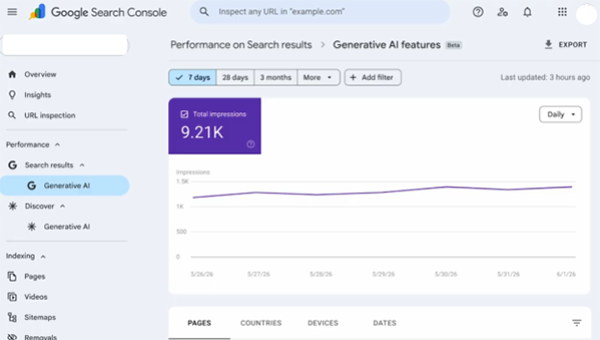
There will be 2 reports in GSC: the Search Result Report for AI mode and AI overview, and the Discovery Report for discovery-linked traffic.
These reports can be accessed by simply visiting the Google Search Console dashboard and clicking the Performance ⇒ Search Results ⇒ Generative AI.
The reports include:
- Impressions, i.e., how many times the pages appeared on AI features.
- Pages and URLs that appeared in the AI features
- Countries from where traffic has been attracted
- Device categories used for browsing the page
- Time period, i.e., hourly, daily, weekly, monthly traffic filters.
Besides these KPIs, it possesses certain shortcomings such as
- Queries for which the pages appeared are not provided.
- Clicks are not provided in the reports.
Another unrelated yet important issue is that the reports include the responses from Google AI overviews and Google AI mode and not from Gemini.
Another major issue is with the calculation of the impressions. Suppose 2 pages of your website appeared on a single AI result page. Then the search report will consider it 1 impression. But the same situation over the discovery report will be counted as 2 impressions in the discovery report.
Suggested Read: Is There A Need to Re-structure Content for AI Visibility?
How to Track Traffic From Google AI Overviews in GA4?
Google rolled out an intuitive feature in May 2026, i.e., New AI Assistant traffic measurement on 13th May, 2026. This feature further simplifies gauging the performance of the website on the AI platforms.
Here are the steps for it.
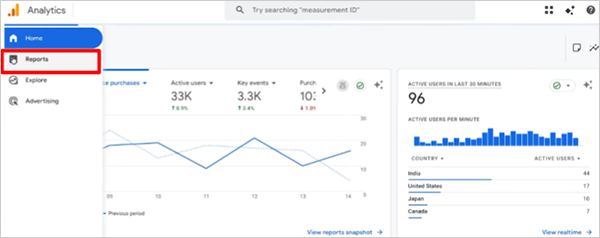
Step 1: Go to the “Reports” section of Google Analytics.
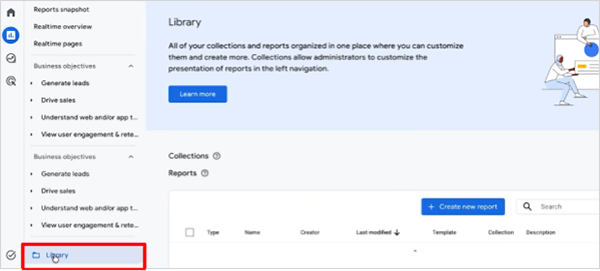
Step 2: Now go to the “Library”.
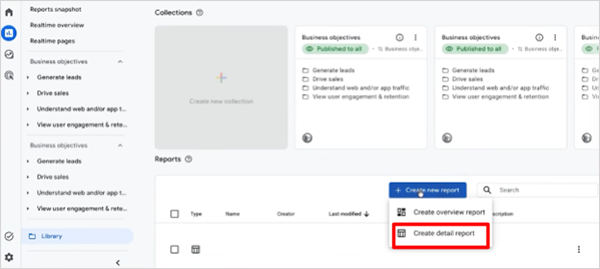
Step 3: Click on “Create a Report” ⇨ “Create a Detailed Report”.
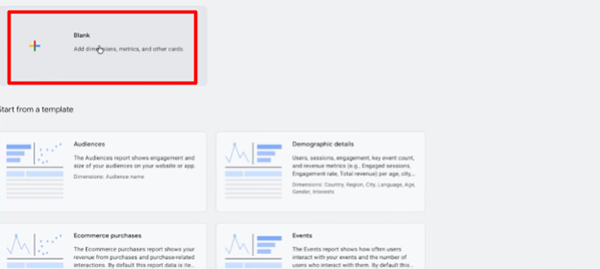
Step 4. Now click on “Blank”
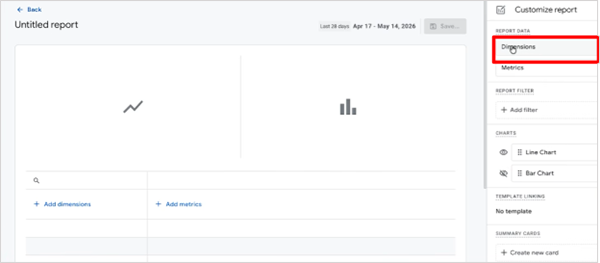
Step 5. Go to the “Dimension” Section.
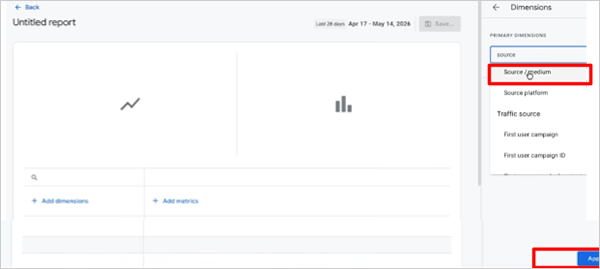
Step 6. Click on “Source/Medium” ⇨ “Apply”.
Step 7. Now click on “Add Filter”
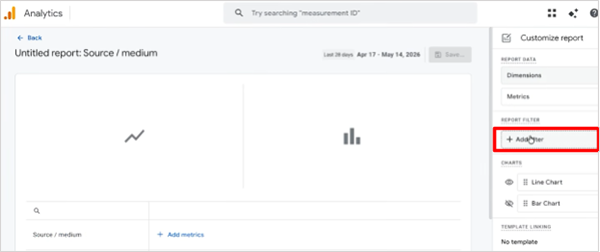
Step 8. Click on “First User Default Channel Group”.
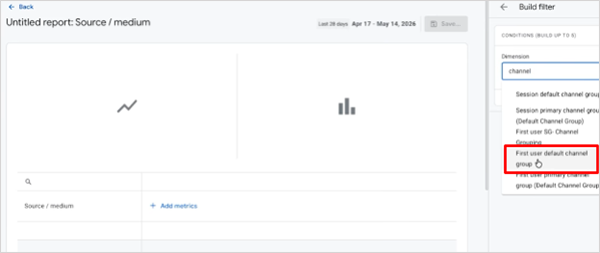
Step 9. Go to “Match Type” ⇨ “Exact Match”
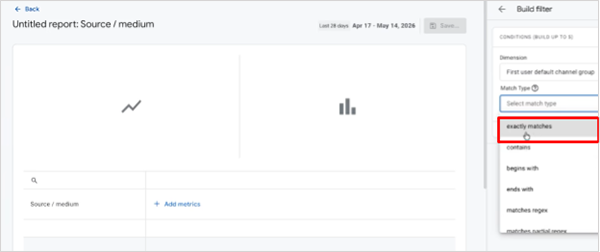
Step 10. Now click on “Value” ⇨ “AI Assistant”
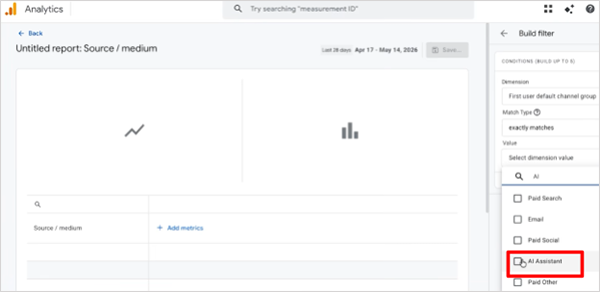
Step 11. Here you can add the metric you want to see, like total users, total revenue, etc., and click on the “Apply” button at the bottom right corner.
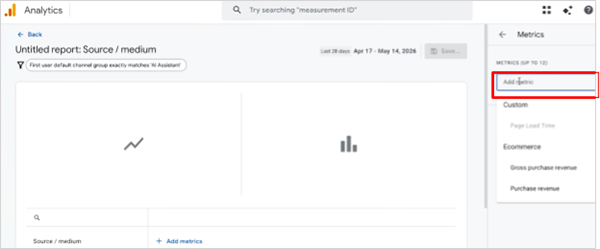
This will show you a detailed report of KPIs related to the AI agents.
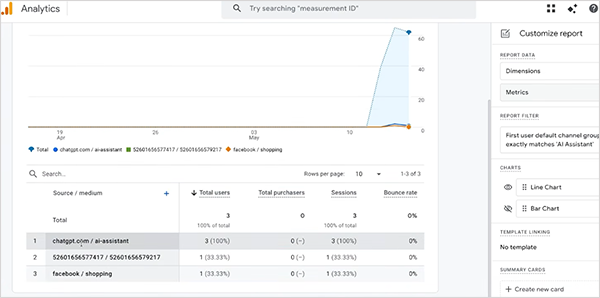
The Digital Marketer’s Perspective
Benjamin, the founder and CEO of Loves Data, has revealed some shortcomings of Google Analytics 4 in a YouTube video. Such as:
- No historical data (data predating 12th May 2026).
- Strict classification criteria.
- Cannot edit the conditions of the “AI Assistant” classification within the Default Channel Group.
- Only reflects the clicks but not the AI visibility, i.e., zero-click visibility, as also affirmed by Ahrefs.
Considering the AI reports in Google Search Console, Marie Haynes, a leading expert in AI and Google Search, is of the view that despite shortcomings, this report is a valuable source for identifying high-value pages and counting impressions to measure AI visibility.
Besides their shortcomings, these reports are also vital to develop Google AI optimisation strategies.
Way Forward
Google is identifying user necessities and engineering fixes for them, like the above procedures, which will help you in learning how to track traffic from Google AI overviews. These reports are just the tip of the iceberg, and more features are yet to come.
All these bring some fresh interfaces and new KPIs for SEO in 2026 to retrace the trajectory of transforming search behaviors.
Leave a Comment
Your email address will not be published. Required fields are marked *