


Search engine ads trigger revenue and have now become an indispensable part of stimulating instant sales.
However, some of the features on ad management dashboards make it easier and more impactful. One such feature is the Promotion Extension, through which ad managers can highlight offers, deals, and discounts below the ads.
If you haven’t used it yet, then gear up to extend your offers to your audience for the upcoming Thanksgiving, Black Friday, and Christmas season.
What Is A Promotion Extension?
A promotion extension is a feature in ad management systems that allows highlighting deals, discounts, and offers in the last line below the search ads.
You might have observed a short and crisp line showing offers and deals just beneath the ads on search engine pages. That’s what a promotion extension does to an ad campaign.
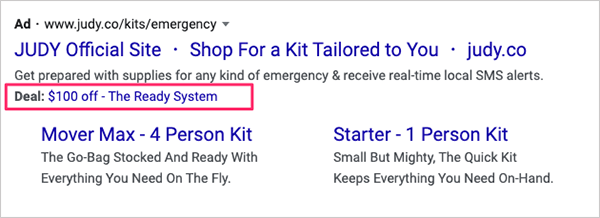
These might also look like:
- 30% off on all styles
- Free shipping on all jeans
- Saved $30 on orders over $300
This feature is incorporated in Google and Microsoft ad managers, and it is also called an ad asset in Google Ads.
Surprisingly, WordStream data says their clients observed a 10% increase in CTR by using this feature.
However, there are certain instructions to adhere to while using this feature to avoid deceiving customers.
Google has explicitly provided some key pointers to consider before opting for promotion extensions/assets. The document has suggested refraining from the following:
- Incorrect promo code details
- Unavailable Offers
- Unclear Relevance
- Unusable Language
Also Read: Google Tightens Disclosure Rules For Ads
What Are The Benefits Of Promotion Extensions?
Being one of the most significant features in ad managers, it comes with many definite and certain implicit benefits.
Considering the benefits, Google says it:
- Allows users to update easily by using the list of pre-populated occasions.
- Supports adding your data without compromising the performance statistics.
- Schedule your ad for any specific occasion.
Microsoft has also shared some of its benefits worth mentioning here, which are:
- Elevate traffic through special offers.
- Inform shoppers better through crisp deal details.
- Raise your market share by increasing chances of users clicking your ad over your competitors.
How To Add A Promotion Extension in Google Ads?
Google promotion extensions, or ad assets, are available in Google Ads Manager, providing users with an immense opportunity to modify ads based on requirements and brand voice.
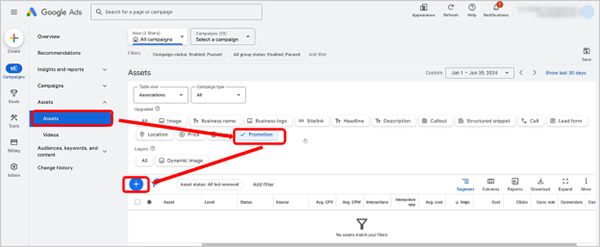
Step 1: Go to the Google Ads dashboard. Then click on Asset → Promotions → 
Step 2: Now add the details asked for on the left side of the window that appears and click SAVE at the bottom of the page. Make sure every detail is correct.
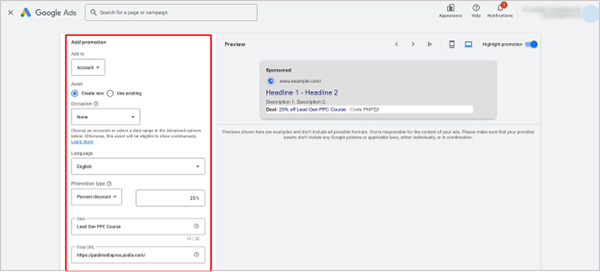
You can see the ad draft with the promotion extension on the right side of the window to understand how it will look to the searchers.
All this is to assist ad managers in developing a campaign that reaches the audience and leaves an impact.
What Digital Marketers Have Opined?
Jyll Saskin Gales has provided 15 different asset (extension) types in Google Ads that you should consider when running your ad campaigns.
Here is what he said.
Daniel Budai also asserted the benefits of using Google ad extensions/assets in his LinkedIn post.
He said:
“If you’re selling a high-ticket item or if price is your unique selling proposition, Price Assets can showcase your pricing upfront. This way, only users who are genuinely interested in your price range click on your ad, saving your budget and increasing the likelihood of conversions.”
Wrap Up
Although the promotion extensions on Google and Microsoft ad managers have further made the ad campaigns more enticing, their other updates, such as Google Ads Sitelink Suggestions, are simplifying the ad management experience for users.
All in all, we can infer that the more features the ad managers get, the greater revenue the brand earns.
Next Read: Google Ads Healthcare Policy News: Latest 2026 Updates



Leave a Comment
Your email address will not be published. Required fields are marked *