

Google has recently announced that:
“we changed our JSON-LD extraction and are now only applying a single pass of HTML unescaping”
This indicates that Google has changed how its crawlers read the JSON-LD structured data.
So, it is high time for technical SEO to gear up and find any hidden gaps and get them resolved as soon as possible.
What is Google’s JSON-LD Escaping News?
The announcement was made by Google through a LinkedIn post, embedded below.
It gives a simple conclusion that the parser will give a single HTML escaping pass rather than resolving the entities multiple times.
Earlier, Google used to decode HTML entities in JSON-LD multiple times, as required. In technical terms, & in a JSON-LD string remained unescaped twice while resolving to a plain ampersand.
But now, it is limited to just one round, i.e., Google will not interpret it as a plain ampersand, but rather as literal text &.
Gary Illyes, an analyst at Google, has suggested referring to section 7 in RFC 8259 (the internet standard that defines JSON) in his LinkedIn post to understand escaping properly.
Although it won’t impact the website rankings, it may impact the site performance indirectly.
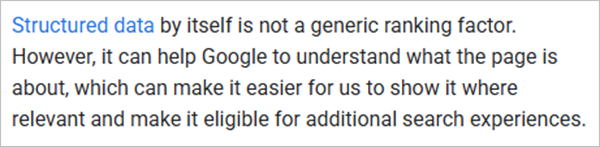
Google says structured data will not impact your rankings, but it eases the crawler in understanding the content.
See the important excerpts from Google’s documents.
Also read: Faceted Navigation and Crawl Budget: The Technical SEO Fix Most Sites Get Wrong
JSON-LD Escaping: How to Test and Fix Double-Escaped Entities
Firstly, you can test whether your JSON-LD is affected or not by following the steps mentioned below.
- Check for an increase in warnings in the structured data report of Google Search Console.
- Find out if the parsed content is replaced by literal entity codes such as #10004.
- Paste the URL or code snippet in Google Search Console’s Rich Results Test or test main pages in Schema Markup Validator at validator.schema.org.
- Search for the ampersand entity followed by any other entity in the raw JSON-LD source. If found, it means double escaping is happening.
If you find issues, here is how to sort them out.
- In case the CMS field auto-escapes HTML, make sure to decode it before writing it in JSON-LD. The rest will be checked by standard JSON escaping.
- Try using Unicode hex escapes instead of numeric HTML entities.
Once done, give it some time to settle and recheck the Rich Results report in Google Search Console to confirm the issue has been addressed fully.
Here, a valuable opinion has been expressed by Nathan Mzumara, Head of SEO & AI Search at OneAdvanced, who stated that it can pose a concern for double and triple escapism. In his blog, he says:

Being a technical development, it is taking time for the digital marketers to digest it and understand its repercussions.
However, the reactions are gradually emerging, like on Reddit with related discussions.
Concluding Words
Google’s JSON-LD escaping update has just driven attention toward structured data. Although it doesn’t have any hazardous impact on ranking, SEOs must still consider it to keep site crawlability up to the mark.
Our suggestion: Check for any JSON-LD impacts, resolve them, take some time, and recheck the status. Respond only when issues are tracked.
Next Read: Google Search Console AI Configuration: What Are Its Functions And Utility?
Leave a Comment
Your email address will not be published. Required fields are marked *