

Want to secure your content from featuring in AI training and grounding without compromising Google Search visibility?
The surest way is to use Google Extended commands in robots.txt. It is in contrast to the Google opt-out toggle in Google Search Console, which was announced in June this year.
Although incorporating it is just a copy paste procedure, there are many nitty-gritty details necessary to imbibe before using this command.
How to Block AI Crawlers With Google-Extended
The simplest method to block Google-Extended is to copy and paste the following code into your robot.txt.
User-agent: Google-Extended
Disallow: /
You can also use the following code to restrict AI crawling in any specific directory by pasting the following code.
user-agent: Google-Extended
Disallow: /directory1
This command is useful for averting only Gemini from using your website content, not other chatbots like ChatGPT, Perplexity, etc.
To make your website immune to crawlers of these chatbots, just replace Google Extended with GPTbot or PerplexityBot in the above command sets.
Suggested Read: Faceted Navigation and Crawl Budget: The Technical SEO Fix Most Sites Get Wrong
Impact of Google Extended in robots.txt?
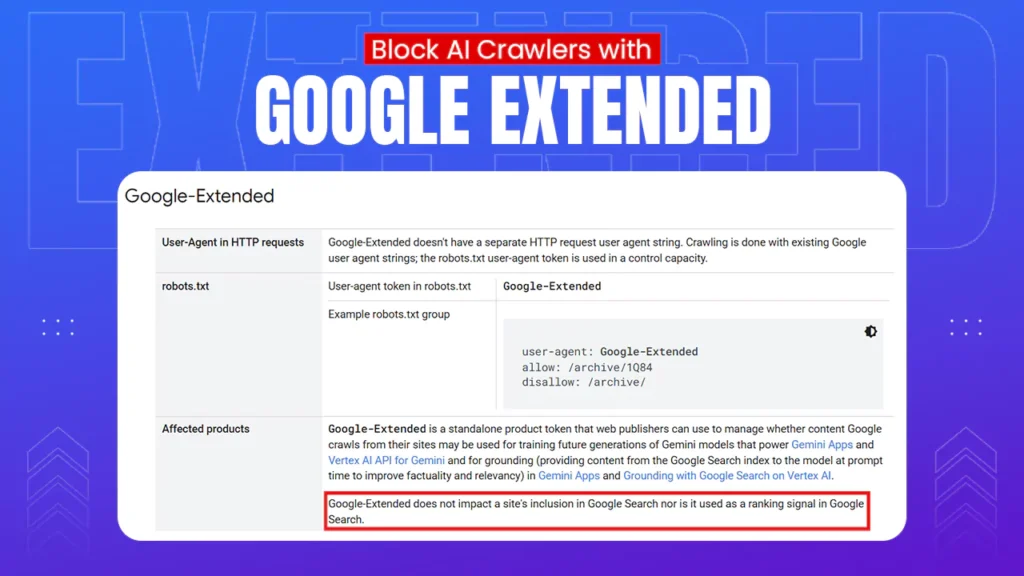
Blocking Google Extended will not impact the visibility of the website on the Google search page. This is confirmed by Google in its document, which says:

Google Extended is not to be confused with Googlebot. While Googlebot crawls the site for Google search, Google Extended is concerned with Google Gemini.
Also, Google AI overviews are a part of the Google search page. Hence, using Google Extended commands in robots .txt can still make your content prone to being exposed on the AI overviews.
Similarly, your website can also be used to answer a query on Google AI mode even after using the Google Extended command.
This feature has been called a safe harbour for users to keep their website ranking while not allowing this content to be reproduced on Gemini.
Google AI opt-out toggle in Google Search Console was released in June this year, and can be considered a much better option if users want to keep the data inaccessible to the AI overview, AI mode, and Generative AI features in Google Discover.
The SEO Experts’ POV
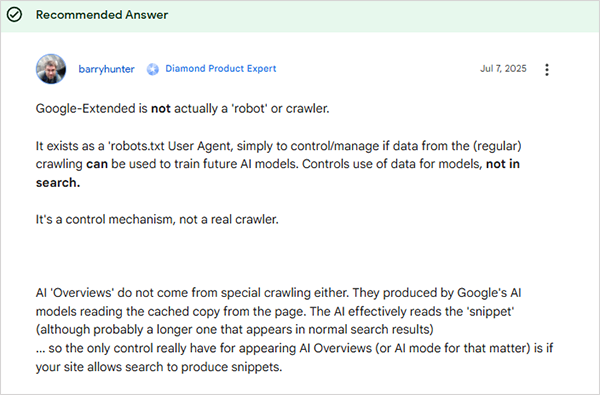
A diamond product expert, Barry Hunter, made the facets around Google Extended clearer while commenting on a Google discussion forum. He called it a robots.txt User Agent rather than a full-fledged crawler.
See what he said:
Furthermore, Glenn Gabe, a popular SEO and AI Search Consultant, has revealed that Google AI bots are being blocked by 79% of the big news publishers across the globe.
Another interesting discussion is worth mentioning here, in which Joe Youngblood, an SEO, AI, and marketing expert, raised concerns over Google extracting his content for AI responses even after adding Google extended commands.
Replying to his issue, Lily Ray, a renowned digital marketer, said that Googlebot-Extended is only concerned with Gemini and not with Google AI overview.
Final Words
Google-Extended is a magnificent remedy to restrict your content from being displayed on Gemini. However, many users have flagged concerns and sought its expansion to Google AI overview and AI mode, which seems a genuine cause considering the contemporary situations, like zero-click visibility, that reduced the traffic of almost all websites.
Let’s hope this demand gets realised soon.
Next Read: Why Does AI Search Prefer Original Research Citations? Possible Gaps and Solutions
Leave a Comment
Your email address will not be published. Required fields are marked *